
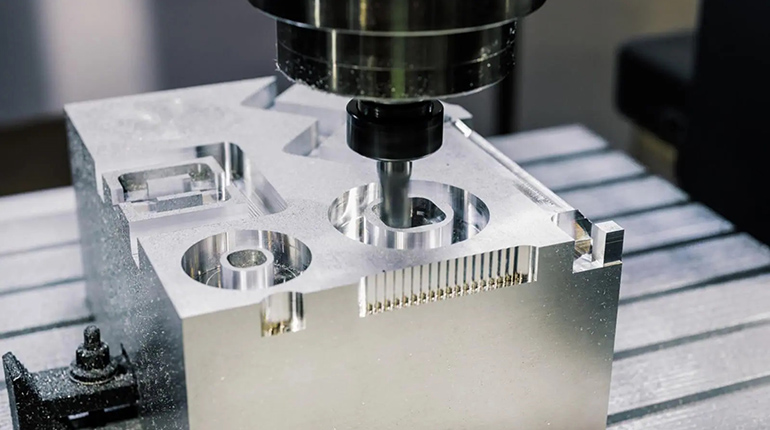
7 Common CNC Milling Problems and How to Fix Them
CNC milling is a precise process, yet errors often occur. This guide covers 7 Common CNC Milling Problems and How to Fix Them effectively.
You will learn to troubleshoot chatter, tool wear, and poor finishes. We provide practical solutions to optimize your machining process today.
Fixing Chatter and Vibration Issues
Chatter is one of the most persistent issues in CNC milling. It creates ugly marks on your parts and destroys cutting tools.
Causes of Machine Chatter
Chatter usually stems from a lack of rigidity in the setup. If your tool overhang is too long, it will vibrate. Loose workholding also allows the part to move under cutting pressure. Additionally, incorrect spindle speeds often trigger resonance frequencies.
Solutions to Reduce Vibration
You must maximize rigidity in your setup immediately. Use the shortest tool holder and end mill possible. Ensure your workpiece is clamped down securely. Finally, adjust your RPM; sometimes slowing down or speeding up eliminates resonance.
Preventing Premature Tool Wear and Breakage

Tools are expensive, and breaking them stops production. Understanding why tools fail is key to maintaining profitability.
Why Cutting Tools Fail Early
Excessive heat is the primary killer of carbide tools. Cutting material that is too hard for the tool grade causes chipping. Furthermore, "chip recutting" grinds waste metal against the cutter, damaging the edge.
Adjusting Feeds and Speeds for Longevity
Always consult the manufacturer’s data for surface footage (SFM). If the tool is chipping, reduce your feed rate. If the tool is wearing prematurely, reduce your spindle speed. Check for tool runout to ensure even cutting load.
Improving Poor Surface Finish Quality
Your customers demand aesthetic perfection. A rough surface finish often leads to rejected parts and wasted material.
Identifying Surface Roughness Causes
Dull tools will tear the metal rather than shear it. A feed rate that is too aggressive leaves visible "scallops." Backlash in the machine axis can also create inconsistent lines.
Techniques for a Smoother Finish
Always perform a dedicated finish pass with a sharp tool. Use "Climb Milling" instead of "Conventional Milling" for better surface quality. Increase your RPM and decrease feed rate for the final pass. This ensures a glossy, smooth result on the workpiece.
Solving Overheating and Burn Marks on Parts
Burnt marks indicate extreme thermal stress. This ruins the visual appeal and alters the material's properties.
The Role of Friction and Coolant
Heat is generated by friction between the tool and the material. If coolant does not reach the cutting zone, heat builds up rapidly. Dull tools rub against the material instead of cutting, generating immense heat.
Optimizing Cutting Parameters to Reduce Heat
Check that your coolant nozzles are aimed directly at the tool tip. Increase your feed rate slightly to prevent rubbing. You want the heat to eject with the chip, not stay in the part. Consider using high-pressure coolant systems for deep pockets.
Correcting Dimensional Accuracy and Tolerance Errors
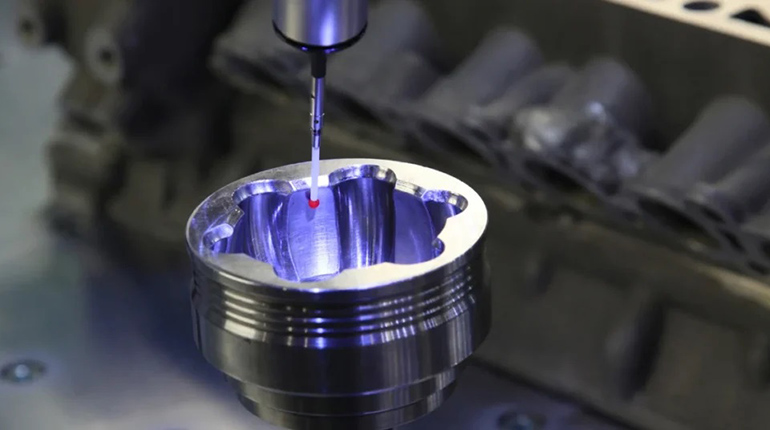
Precision is the core of CNC machining. If a part is out of tolerance, it is effectively scrap.
Sources of Precision Inaccuracy
Thermal expansion of the machine screw can shift coordinates. Tool deflection occurs when the cutter bends under load. Worn-out machine ways or ball screws lead to positioning errors.
Calibrating Machines for Tight Tolerances
Always warm up your machine before running tight tolerance parts. Use shorter tools to minimize deflection and improve rigidity. Implement on-machine probing to verify dimensions during the process. Regularly calibrate your machine’s backlash settings.
Avoiding Chip Recutting and Evacuation Issues
Chips must be removed from the cutting zone instantly. Failure to do so leads to catastrophic tool failure.
Dangers of Chip Accumulation
Accumulated chips pack into flutes and break the cutter. Recutting chips damages the surface finish of the part. It causes heat to build up locally, work-hardening the material.
Improving Coolant Flow and Chip Removal
Use air blasts for dry machining materials like steel. Ensure flood coolant has enough pressure to flush pockets. For deep holes, use "peck drilling" cycles to break chips. Install chip conveyors to keep the machine enclosure clear.
Resolving Improper Workholding and Clamping Failures

If the part moves, the job is ruined. Proper workholding is the foundation of accurate machining.
Signs of Unstable Workpieces
You might see chatter marks specifically in the center of the part. Dimensional inconsistencies often indicate the part lifted during cutting. Visible indentations from clamps suggest excessive force or poor fit.
Choosing the Right Fixtures
Use soft jaws machined to the specific shape of your part. For thin plates, consider vacuum tables to distribute holding force. Ensure clamping pressure is sufficient but not deforming the part. Check that all bolts and vices are torqued correctly.
General Best Practices for CNC Troubleshooting
Consistent quality requires a proactive approach to maintenance and setup.
- Keep machines clean: Debris ruins accuracy.
- Simulate paths: Use CAM software to check for collisions.
- Standardize tools: Use high-quality collets and holders.
- Listen: A skilled machinist can hear when a cut sounds wrong.
Trust Standard Machining for Defect-Free Parts
Troubleshooting CNC issues consumes time and money. At Standard Machining, we utilize state-of-the-art equipment and experienced engineers. We guarantee precision, eliminate defects, and deliver on time. Partner with us for reliable, high-quality manufacturing solutions.
Conclusion
Mastering CNC troubleshooting ensures high-quality parts and reduces operational costs. By proactively addressing vibration, heat, and tooling issues, you maintain efficiency and precision in every project.
Need parts machined right the first time? Contact Standard Machining today for a free quote.
FAQs: Common CNC Milling Questions
What causes chatter marks on machined parts?
Chatter is primarily caused by excessive tool overhang or a lack of rigidity. It can also result from incorrect spindle speeds causing resonance (vibration) in the machine.
How can I extend the life of my CNC tools?
You can extend tool life by optimizing feeds and speeds to reduce heat. Always use the correct coolant and ensure rigid workholding to prevent micro-vibrations that chip edges.
Why is my CNC machine overheating the material?
Overheating usually happens when the tool rubs instead of cuts. This is caused by dull tools, insufficient feed rates, or a lack of proper coolant flow to the cutting zone.
How do I improve the surface finish on aluminum?
To improve aluminum finishes, use polished, sharp carbide tools designed for non-ferrous metals. High spindle speeds and specifically "Climb Milling" paths produce the best results.
Recent Posts

LET’S START WORK
TOGETHER
Please feel free to contact us. We will get back to you with 1-2 business days. Or just call us now.